[카테고리:] 생활코딩

  • 4장 process 로그 확인

    책 “디버깅을 통해.. 리눅스 커널” 148 페이지 예제를 실행했다. 잘 따라 해야 한다. trace 를 죽이고 살리는 과정에 오타로 살짝 헷갈렸다. 책은 /sys/kernel/debug/tracing/trace를 복사하는 script를 만들었다. 디버그 메세지를 보려면 이벤트 발생 후 바로 복사해야지, 타이핑한다고 늦게 하면 이전 기록을 시스템이 지워버린다. trace 파일을 지울 수 없다. 초기화 하려면 tracing_on에 0을 다시 써줘야 한다. 아래와 같은 기록을 뽑아 냈다. 다 적을 수 없어, 중요한 부분만 추출했다. 생각이 맞는지 모르겠다.

    5825  => sys_clone+0x18/0x3c
    5826  => ret_fast_syscall+0x0/0x28
    5827  => 0xbed826b0
    5828             bash-1921  [002] .... 32848.024289: _do_fork+0x14/0x41c <-sys_clone+0x34/0x3c
    5829             bash-1921  [002] .... 32848.024299: <stack trace>
    5830  => _do_fork+0x18/0x41c
    5831  => sys_clone+0x34/0x3c
    5832  => ret_fast_syscall+0x0/0x28
    5833  => 0xbed826b0
    5834           <idle>-0     [000] dns. 32848.024300: sched_wakeup: comm=kworker/u8:3 pid=2958 prio=120 target_cpu=000
    5835             bash-1921  [002] .... 32848.024301: copy_process.part.0+0x14/0x1ac4 <-_do_fork+0xc4/0x41c
    5836           <idle>-0     [000] d... 32848.024307: sched_switch: prev_comm=swapper/0 prev_pid=0 prev_prio=120 prev_state=R ==> next_comm=kworker/u8:3 next_pid=2958 next_prio=120
    5837             bash-1921  [002] .... 32848.024310: <stack trace>
    5838  => copy_process.part.0+0x18/0x1ac4
    5839  => _do_fork+0xc4/0x41c
    5840  => sys_clone+0x34/0x3c
    5841  => ret_fast_syscall+0x0/0x28
    5842  => 0xbed826b0
    5843     kworker/u8:3-2958  [000] d... 32848.024324: sched_switch: prev_comm=kworker/u8:3 prev_pid=2958 prev_prio=120 prev_state=I ==> next_comm=swapper/0 next_pid=0 next_prio=120
    5844             bash-1921  [002] .... 32848.024940: sched_process_fork: comm=bash pid=1921 child_comm=bash child_pid=3043
    5845           <idle>-0     [003] d... 32848.024981: sched_switch: prev_comm=swapper/3 prev_pid=0 prev_prio=120 prev_state=R ==> next_comm=bash next_pid=3043 next_prio=120
    5846    raspbian_proc-3043  [003] d... 32848.025568: sched_switch: prev_comm=bash prev_pid=3043 prev_prio=120 prev_state=S ==> next_comm=swapper/3 next_pid=0 next_prio=120
    5847           <idle>-0     [003] dnh. 32848.025595: sched_wakeup: comm=bash pid=3043 prio=120 target_cpu=003
    5848           <idle>-0     [003] d... 32848.025608: sched_switch: prev_comm=swapper/3 prev_pid=0 prev_prio=120 prev_state=R ==> next_comm=bash next_pid=3043 next_prio=120
    5849             bash-1921  [002] d... 32848.025727: sched_switch: prev_comm=bash prev_pid=1921 prev_prio=120 prev_state=S ==> next_comm=swapper/2 next_pid=0 next_prio=120
    5850           <idle>-0     [000] dnh. 32848.026664: sched_wakeup: comm=irq/36-mmc1 pid=82 prio=49 target_cpu=000
    5851           <idle>-0     [000] d... 32848.026684: sched_switch: prev_comm=swapper/0 prev_pid=0 prev_prio=120 prev_state=R ==> next_comm=irq/36-mmc1 next_pid=82 next_prio=49
    5852      irq/36-mmc1-82    [000] d.s. 32848.026720: sched_wakeup: comm=irq/36-mmc1 pid=82 prio=49 target_cpu=000
    5853      irq/36-mmc1-82    [000] d.s. 32848.026763: sched_wakeup: comm=irq/36-mmc1 pid=82 prio=49 target_cpu=000
    5854      irq/36-mmc1-82    [000] d.s. 32848.026806: sched_wakeup: comm=irq/36-mmc1 pid=82 prio=49 target_cpu=000
    5855      irq/36-mmc1-82    [000] d... 32848.026823: sched_wakeup: comm=kworker/u8:3 pid=2958 prio=120 target_cpu=000
    5856      irq/36-mmc1-82    [000] d... 32848.026840: sched_switch: prev_comm=irq/36-mmc1 prev_pid=82 prev_prio=49 prev_state=S ==> next_comm=kworker/u8:3 next_pid=2958 next_prio=120
    5857     kworker/u8:3-2958  [000] d.s. 32848.026900: sched_wakeup: comm=kworker/u8:3 pid=2958 prio=120 target_cpu=000
    5858     kworker/u8:3-2958  [000] d.s. 32848.026946: sched_wakeup: comm=kworker/u8:3 pid=2958 prio=120 target_cpu=000
    ...
    8445     kworker/u8:0-2918  [001] d... 32866.110752: sched_switch: prev_comm=kworker/u8:0 prev_pid=2918 prev_prio=120 prev_state=I ==> next_comm=bash next_pid=3013 next_prio=120
    8446             bash-3013  [001] d... 32866.110848: signal_generate: sig=9 errno=0 code=0 comm=raspbian_proc pid=3043 grp=1 res=0
    8447           <idle>-0     [003] dnh. 32866.110856: sched_wakeup: comm=raspbian_proc pid=3043 prio=120 target_cpu=003
    8448           <idle>-0     [003] d... 32866.110870: sched_switch: prev_comm=swapper/3 prev_pid=0 prev_prio=120 prev_state=R ==> next_comm=raspbian_proc next_pid=3043 next_prio=120
    8449    raspbian_proc-3043  [003] d... 32866.110880: signal_deliver: sig=9 errno=0 code=0 sa_handler=0 sa_flags=0
    8450    raspbian_proc-3043  [003] .... 32866.110883: do_exit+0x14/0xbd4 <-do_group_exit+0x50/0xe8
    8451    raspbian_proc-3043  [003] .... 32866.110909: <stack trace>
    8452  => do_exit+0x18/0xbd4
    8453  => do_group_exit+0x50/0xe8
    8454  => get_signal+0x160/0x85c
    8455  => do_signal+0x360/0x4a4
    8456  => do_work_pending+0xd4/0xec
    8457  => slow_work_pending+0xc/0x20
    8458  => 0xb6e1969c
    8459    raspbian_proc-3043  [003] .... 32866.111230: sched_process_exit: comm=raspbian_proc pid=3043 prio=120
    8460    raspbian_proc-3043  [003] d... 32866.111296: signal_generate: sig=17 errno=0 code=2 comm=bash pid=1921 grp=1 res=0
    8461           <idle>-0     [002] dnh. 32866.111311: sched_wakeup: comm=bash pid=1921 prio=120 target_cpu=002
    8462             bash-3013  [001] dn.. 32866.111313: sched_wakeup: comm=kworker/u8:0 pid=2918 prio=120 target_cpu=001
    8463           <idle>-0     [002] d... 32866.111327: sched_switch: prev_comm=swapper/2 prev_pid=0 prev_prio=120 prev_state=R ==> next_comm=bash next_pid=1921 next_prio=120
    8464    raspbian_proc-3043  [003] d... 32866.111330: sched_switch: prev_comm=raspbian_proc prev_pid=3043 prev_prio=120 prev_state=Z ==> next_comm=kworker/u8:0 next_pid=2918 next_prio=120
    8465           <idle>-0     [000] dnh. 32866.111359: sched_wakeup: comm=sshd pid=3010 prio=120 target_cpu=000
    8466             bash-3013  [001] d... 32866.111362: sched_switch: prev_comm=bash prev_pid=3013 prev_prio=120 prev_state=S ==> next_comm=swapper/1 next_pid=0 next_prio=120
    8467     kworker/u8:0-2918  [003] d... 32866.111364: sched_switch: prev_comm=kworker/u8:0 prev_pid=2918 prev_prio=120 prev_state=I ==> next_comm=swapper/3 next_pid=0 next_prio=120
    8468           <idle>-0     [000] d... 32866.111374: sched_switch: prev_comm=swapper/0 prev_pid=0 prev_prio=120 prev_state=R ==> next_comm=sshd next_pid=3010 next_prio=120
    8469           <idle>-0     [003] dnh. 32866.111531: sched_wakeup: comm=kworker/u8:0 pid=2918 prio=120 target_cpu=003
    8470           <idle>-0     [003] d... 32866.111539: sched_switch: prev_comm=swapper/3 prev_pid=0 prev_prio=120 prev_state=R ==> next_comm=kworker/u8:0 next_pid=2918 next_prio=120
    8471             sshd-3010  [000] d... 32866.111572: sched_switch: prev_comm=sshd prev_pid=3010 prev_prio=120 prev_state=S ==> next_comm=swapper/0 next_pid=0 next_prio=120
    
    • bash pid는 1921이다.
    • 5844행에서 child_pid 3043으로 자식 프로세스를 만들었다.
    • 5846행에서 raspbian_proce를 볼 수 있다.
    • 이 전에 5836행에서 다음 프로세스 id 2958을 가지고 거꾸로 sys_clone -> _do-fork -> copy_process를 실행했다.
    • 5836 행에서 next pid 2958(5857행)로 넘어가야 하는데 fork 하느라 다음 행을 실행했다.

    Linux process states

    As in every Unix flavour, in Linux a process can be in a number of states. It’s easiest to observe it in tools like ps or top: it’s usually in the column named S. The documentation of ps describes the possible values:

    PROCESS STATE CODES
       R  running or runnable (on run queue)
       D  uninterruptible sleep (usually IO)
       S  interruptible sleep (waiting for an event to complete)
       Z  defunct/zombie, terminated but not reaped by its parent
       T  stopped, either by a job control signal or because
          it is being traced
       [...]
    

    A process starts its life in an R “running” state and finishes after its parent reaps it from the Z “zombie” state.

    • 8449행에서 signo 9번을 받았다.
    • 시그널 9번을 받아 시그널 17 발생 시켰다.
    • slow_work_pending -> do_work_pending -> do_signal -> get_signal -> do_group_exit -> do_exit 순으로 실행한다.
  • raspberry pi4 커널 컴파일

    삼국지도 다 끝났고, 남는 시간에 리눅스 커널을 배워 보기로 했다. 시간 남을 땐 이게 효과가 확실하지. 전에 샀던 “디버깅을 통해 배우는 리눅스 커널의 구조와 원리”를 따라 해보기로 했다. 커널이 리눅스 심장과 같아 꼭 배울 필요는 없지만, 알면 편하게 살 수 있다. 리눅스 역시 과거 서버를 벗어나 arm에 로딩되어 여러 임베디드 리눅스로 사용되고 있다. 라즈베리 파이 역시 미친 가격으로 집에서 누구나 쉽게 구할 수 있다. 지금 IoT가 뜨고 있는데 안 배울 이유가 없다.

    책에 나온 커널이 버전 4.19다. 2021. 5월 업데이트를 하면 커널 5.10을 사용한다. 일단 커널을 4.19 버전으로 강제로 맞춰야 한다.

    pi@raspberrypi:~ $ uname -a
    Linux raspberrypi 5.10.17-v7l+ #1414 SMP Fri Apr 30 13:20:47 BST 2021 armv7l GNU/Linux

    책 53 페이지에 나온대로 따라했다. 15년전에 비하면 정말 편해졌다. 그 때 컴파일 옵션이 너무 많아 하드웨어 지식이 없어 무엇을 선택할 지 몰랐다.

    #https://www.raspberrypi.org/documentation/linux/kernel/building.md
    
    #필요 모듈 설치.
    sudo apt install git bc bison flex libssl-dev make
    
    git clone --depth=1 --branch rpi-4.19.y https://github.com/raspberrypi/linux
    
    cd linux
    #KERNEL=kernel7
    KERNEL=kernel7l
    #make bcm2709_defconfig
    make bcm2711_defconfig

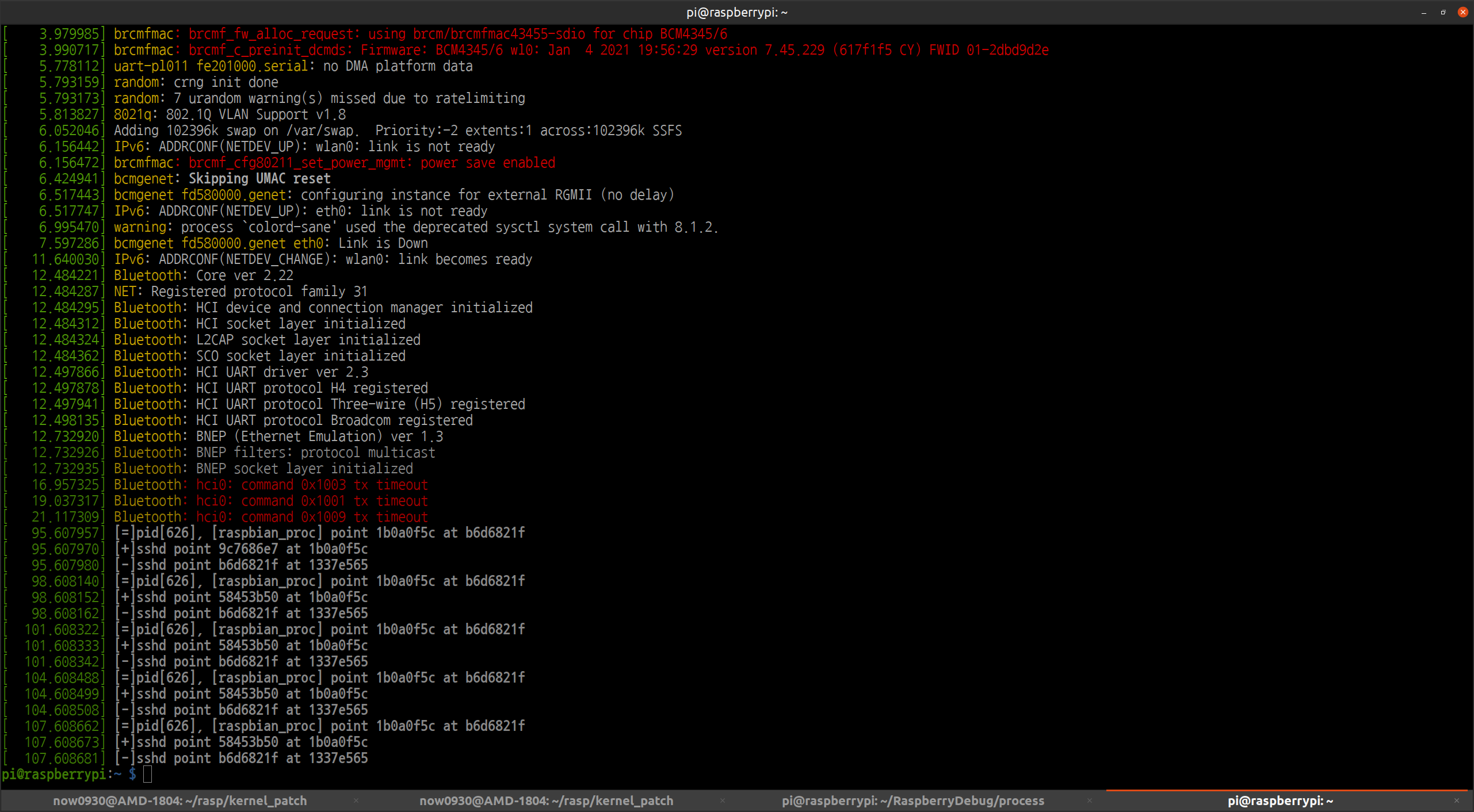
    책은 make bcm2709_defconfig로 컴파일 옵션을 설정했다. 아무 생각없이 따라하다 보면 usb를 하나도 인식하지 못하는 현상을 겪는다.

    pi@raspberrypi:~ $ lsusb
    pi@raspberrypi:~ $

    이거 때문에 한동안 고민했다. make menu로 usb를 설정하는 옵션을 찾아 켜주면 될 듯 한데, 내가 많이 몰라 다른 옵션을 어떻게 설정할지 판단 못하겠다. 옵션 하나 켜겠다고 그 짓을 해야되나… usb가 막혀 키보드도 연결되지 않고, usb 메모리, 카메라 등 아무것도 연결되지 않았다. usb 4포트가 모두 불량인 줄 알고 환불할 뻔 했다.

    pi@raspberrypi:~ $ cat /proc/cpuinfo
    processor	: 0
    model name	: ARMv7 Processor rev 3 (v7l)
    BogoMIPS	: 270.00
    Features	: half thumb fastmult vfp edsp neon vfpv3 tls vfpv4 idiva idivt vfpd32 lpae evtstrm crc32 
    CPU implementer	: 0x41
    CPU architecture: 7
    CPU variant	: 0x0
    CPU part	: 0xd08
    CPU revision	: 3
    
    processor	: 1
    model name	: ARMv7 Processor rev 3 (v7l)
    BogoMIPS	: 270.00
    Features	: half thumb fastmult vfp edsp neon vfpv3 tls vfpv4 idiva idivt vfpd32 lpae evtstrm crc32 
    CPU implementer	: 0x41
    CPU architecture: 7
    CPU variant	: 0x0
    CPU part	: 0xd08
    CPU revision	: 3
    
    processor	: 2
    model name	: ARMv7 Processor rev 3 (v7l)
    BogoMIPS	: 270.00
    Features	: half thumb fastmult vfp edsp neon vfpv3 tls vfpv4 idiva idivt vfpd32 lpae evtstrm crc32 
    CPU implementer	: 0x41
    CPU architecture: 7
    CPU variant	: 0x0
    CPU part	: 0xd08
    CPU revision	: 3
    
    processor	: 3
    model name	: ARMv7 Processor rev 3 (v7l)
    BogoMIPS	: 270.00
    Features	: half thumb fastmult vfp edsp neon vfpv3 tls vfpv4 idiva idivt vfpd32 lpae evtstrm crc32 
    CPU implementer	: 0x41
    CPU architecture: 7
    CPU variant	: 0x0
    CPU part	: 0xd08
    CPU revision	: 3
    
    Hardware	: BCM2711
    Revision	: b03114
    Serial		: 100000003d82cd51
    Model		: Raspberry Pi 4 Model B Rev 1.4
    

    책에 없지만, 웹 사이트와 여기 보드 정보를 보면 bcm2711을 사용했다. 이 옵션이 맞다. 이게 customized 제품과 대량 생산품 차이다. 이 옵션을 개인이 일일히 다 넣어주려면 힘들겠다. 표준화된 하드웨어를 사용함이 훨씬 낫다. 아무리 많이 판대도 raspberry pi 만큼 팔릴 수 있을 지 모르겠다. 단가에서 경쟁하기 어렵다고 본다.

    make -j4 zImage modules dtbs
    sudo make modules_install
    sudo cp arch/arm/boot/dts/*.dtb /boot/
    sudo cp arch/arm/boot/dts/overlays/*.dtb* /boot/overlays/
    sudo cp arch/arm/boot/dts/overlays/README /boot/overlays/
    sudo cp arch/arm/boot/zImage /boot/$KERNEL.img

    나머지를 실행한다. boot 디렉토리 파일을 덮어쓰기 전에 기존 파일을 꼭 백업해야 한다. 그냥 날려 버리면 나처럼 다시 이미지를 구워야 한다.

    pi@raspberrypi:~ $ lsusb
    Bus 002 Device 001: ID 1d6b:0003 Linux Foundation 3.0 root hub
    Bus 001 Device 002: ID 2109:3431 VIA Labs, Inc. Hub
    Bus 001 Device 001: ID 1d6b:0002 Linux Foundation 2.0 root hub
    pi@raspberrypi:~ $ uname -a
    Linux raspberrypi 4.19.127-v7l+ #2 SMP Thu May 13 15:17:29 BST 2021 armv7l GNU/Linux

    1.5시간 컴파일 후 정상적으로 부팅했음을 확인했다.

    cross compile을 하기로 했다. 1.5 시간이 10분으로 줄어드는 마법을 보았다. https://www.raspberrypi.org/documentation/linux/kernel/building.md 사이트에 가면 cross compile 하는 방법이 나와 있다. 그대로 따라하면 된다.

    /boot 디렉토리 내용을 통째로 날렸는데, 그러면 안된다. start.elf 파일이 없다고 부팅되지 않는다.

    pi@raspberrypi:/boot $ ls -l
    total 27721
    -rwxr-xr-x 1 root root   24270 May 15  2021 bcm2708-rpi-b-plus.dtb
    -rwxr-xr-x 1 root root   24007 May 15  2021 bcm2708-rpi-b.dtb
    -rwxr-xr-x 1 root root   23788 May 15  2021 bcm2708-rpi-cm.dtb
    -rwxr-xr-x 1 root root   24448 May 15  2021 bcm2708-rpi-zero-w.dtb
    -rwxr-xr-x 1 root root   23712 May 15  2021 bcm2708-rpi-zero.dtb
    -rwxr-xr-x 1 root root   25334 May 15  2021 bcm2709-rpi-2-b.dtb
    -rwxr-xr-x 1 root root   25483 May 15  2021 bcm2710-rpi-2-b.dtb
    -rwxr-xr-x 1 root root   27143 May 15  2021 bcm2710-rpi-3-b-plus.dtb
    -rwxr-xr-x 1 root root   26524 May 15  2021 bcm2710-rpi-3-b.dtb
    -rwxr-xr-x 1 root root   25338 May 15  2021 bcm2710-rpi-cm3.dtb
    -rwxr-xr-x 1 root root   41185 May 15  2021 bcm2711-rpi-4-b.dtb
    -rwxr-xr-x 1 root root   18695 May 15  2021 bcm2835-rpi-a-plus.dtb
    -rwxr-xr-x 1 root root   18579 May 15  2021 bcm2835-rpi-a.dtb
    -rwxr-xr-x 1 root root   18982 May 15  2021 bcm2835-rpi-b-plus.dtb
    -rwxr-xr-x 1 root root   18858 May 15  2021 bcm2835-rpi-b-rev2.dtb
    -rwxr-xr-x 1 root root   18725 May 15  2021 bcm2835-rpi-b.dtb
    -rwxr-xr-x 1 root root   18690 May 15  2021 bcm2835-rpi-cm1-io1.dtb
    -rwxr-xr-x 1 root root   19173 May 15  2021 bcm2835-rpi-zero-w.dtb
    -rwxr-xr-x 1 root root   18647 May 15  2021 bcm2835-rpi-zero.dtb
    -rwxr-xr-x 1 root root   19558 May 15  2021 bcm2836-rpi-2-b.dtb
    -rwxr-xr-x 1 root root   21027 May 15  2021 bcm2837-rpi-3-b-plus.dtb
    -rwxr-xr-x 1 root root   20238 May 15  2021 bcm2837-rpi-3-b.dtb
    -rwxr-xr-x 1 root root   52456 May 15  2021 bootcode.bin
    -rwxr-xr-x 1 root root     121 May 15  2021 cmdline.txt
    -rwxr-xr-x 1 root root    1809 May 15  2021 config.txt
    -rwxr-xr-x 1 root root    7314 May 15  2021 fixup.dat
    -rwxr-xr-x 1 root root    5446 May 15  2021 fixup4.dat
    -rwxr-xr-x 1 root root    3191 May 15  2021 fixup4cd.dat
    -rwxr-xr-x 1 root root    8454 May 15  2021 fixup4db.dat
    -rwxr-xr-x 1 root root    8452 May 15  2021 fixup4x.dat
    -rwxr-xr-x 1 root root    3191 May 15  2021 fixup_cd.dat
    -rwxr-xr-x 1 root root   10298 May 15  2021 fixup_db.dat
    -rwxr-xr-x 1 root root   10298 May 15  2021 fixup_x.dat
    -rwxr-xr-x 1 root root     145 May 15  2021 issue.txt
    -rwxr-xr-x 1 root root 5773448 May 15  2021 kernel7l.img
    drwxr-xr-x 2 root root   16384 May 15  2021 overlays
    -rwxr-xr-x 1 root root 2952928 May 15  2021 start.elf
    -rwxr-xr-x 1 root root 2228768 May 15  2021 start4.elf
    -rwxr-xr-x 1 root root  793084 May 15  2021 start4cd.elf
    -rwxr-xr-x 1 root root 3722504 May 15  2021 start4db.elf
    -rwxr-xr-x 1 root root 2981160 May 15  2021 start4x.elf
    -rwxr-xr-x 1 root root  793084 May 15  2021 start_cd.elf
    -rwxr-xr-x 1 root root 4794472 May 15  2021 start_db.elf
    -rwxr-xr-x 1 root root 3704712 May 15  2021 start_x.elf
    

    overlays 내용을 날리고, 새로 컴파일 버전으로 설치했고, start.elf, *.dat, bootcode.bin, *.txt를 전에 받았던 백업에서 복사했다. 다행히 잘 된다. 두 번은 하지만, 세 번은 못 하겠다. 책이 왜 스크립트를 설명했는지 이해된다.

  • Unity 물체 움직이기, 충돌 감지, 변수 수정하기

    레이아웃에 있는 물체를 움직이고 싶다. 5개 공정에 (종류가 다른?) 대차가 있고 셔틀이 한번에 밀어준다. 공정 마지막에 도착한 대차는 셔틀이 동작한 종방향이 아닌 횡방향으로 이동한다. 유니티로 쉽게 구현할 줄 알았는데 돌고돌아 겨우 한 개 움직였다.

    1. 대차, 셀에 collider 설정.
    2. 셀에 rigidBody 설정.
    3. 받히는 객체 (박스) 콜라이더에 트리거 설정.
    4. getComponent로 스크립에 사용한 변수 수정.

    이런 식으로 했다. 이 방법이 맞는 줄 모르겠으나 일단 되니 문제 없다 믿고싶다. 기본 기술인듯 한데 개념을 모르니 어렵다.

    https://sugargames.tistory.com/11
    https://docs.unity3d.com/kr/530/ScriptReference/Collider2D.OnTriggerEnter2D.html
  • Unity 시작하기 + vccode

    리눅스에서 Unity를 설치하면 비주얼 스튜디오를 사용할 수 없어 코드 자동완성을 지원받을 수 없다. Vim이 잘 해주면 좋은데 이런쪽으로 지원이 꽝이라 Visual Studio을 Virtual Box에 설치했다. Unity에서 Visual Studio로 연계하여 열어야 프로젝트를 Unity와 연계하여 자동완성을 하는 듯 한데, 리눅스에 설치된 유니티와 또 버전이 조금씩 달라 연동되지 않았다. 과감히 포기하고 리눅스에 vscode를 설치했다.

    https://webnautes.tistory.com/1197

    Mono-dev 설치

    https://www.mono-project.com/download/stable/#download-lin-ubuntu

    옵션에서 설정 변경

    omnisharp.useGlobalMono=always

    https://www.ifunfactory.com/engine/documents/reference/ko/development-on-vscode.html#intellisense

    먼가 잘 안되는데 나중에 Docker로 시도해야겠다. 마이크로 소프트가 요즘 리눅스와 좀 사이좋게 지내는 듯 하다.

  • 라즈베리 파이4 온도/습도센서 홈페이지에 연결(그래프 추가)

    프린터 서버로 동작하는 라즈베리 파이에 온도, 습도를 측정하는 dht11 센서를 달았다. 센서는 1,500원인데 배송비 포함 4,000원에 구매했다. 인터넷에서 바로 사용할 수 있는 python 코드를 찾았지만 동작하지 않아 gcc로 된 코드를 사용했다. 아래 그림과 같이 구성했다.

    111에러가 홈 서버 접속 시도를 차단했다. 찾아보니 서버 내 my.cnf 파일 bind 설정을 수정해야 함을 알았다.

    워드 프레스 테마 디렉토리 안 functions.php를 보면 사용자 정의 함수를 만들고, 데이터베이스를 조회할 수 있다. functions.php 파일을 수정하기 보다, header.php를 간단하게 수정했다. 스타일 등 html을 잘 모르기 때문에 가장 간단한 정보만 표시했다. 아래는 header.php 파일이다. 마지막에 4줄 정도만 넣었다.

    <?php
    /**
     * The header for our theme
     *
     * This is the template that displays all of the <head> section and everything up until <div id="content">
     *
     * @link https://developer.wordpress.org/themes/basics/template-files/#template-partials
     *
     * @package WordPress
     * @subpackage Twenty_Seventeen
     * @since Twenty Seventeen 1.0
     * @version 1.0
     */
    
    ?><!DOCTYPE html>
    <html <?php language_attributes(); ?> class="no-js no-svg">
    <head>
    <meta charset="<?php bloginfo( 'charset' ); ?>">
    <meta name="viewport" content="width=device-width, initial-scale=1">
    <link rel="profile" href="https://gmpg.org/xfn/11">
    
    <?php wp_head(); ?>
    </head>
    
    <body <?php body_class(); ?>>
    <?php wp_body_open(); ?>
    <div id="page" class="site">
    	<a class="skip-link screen-reader-text" href="#content"><?php _e( 'Skip to content', 'twentyseventeen' ); ?></a>
    
    	<header id="masthead" class="site-header" role="banner">
    
    		<?php get_template_part( 'template-parts/header/header', 'image' ); ?>
    
    		<?php if ( has_nav_menu( 'top' ) ) : ?>
    			<div class="navigation-top">
    				<div class="wrap">
    					<?php get_template_part( 'template-parts/navigation/navigation', 'top' ); ?>
    				</div><!-- .wrap -->
    			</div><!-- .navigation-top -->
    		<?php endif; ?>
    
    	</header><!-- #masthead -->
    
    	<?php
    
    	/*
    	 * If a regular post or page, and not the front page, show the featured image.
    	 * Using get_queried_object_id() here since the $post global may not be set before a call to the_post().
    	 */
    	if ( ( is_single() || ( is_page() && ! twentyseventeen_is_frontpage() ) ) && has_post_thumbnail( get_queried_object_id() ) ) :
    		echo '<div class="single-featured-image-header">';
    		echo get_the_post_thumbnail( get_queried_object_id(), 'twentyseventeen-featured-image' );
    		echo '</div><!-- .single-featured-image-header -->';
    	endif;
    	?>
    
    
    	<div class="site-content-contain">
    		<div id="content" class="site-content">
    
    /*여기 추가*/
    <div align="center">
    <?php
    $mydb = new wpdb('????','?????','???','???');$results = $mydb->get_results("SELECT * FROM `dataTemperatureAndHumidity` ORDER BY `dataTemperatureAndHumidity`.`time` DESC limit 1");foreach($results as $result){echo "온도: "; echo $result->temperature; echo ", 습도: "; echo $result->humidity;echo ", 수집시각: ";echo $result->time;}
    ?></div>
    

    다음은 라즈베리안에서 돌아가는 gcc 파일이다. 인터넷 파일 그대로 사용했고, crobtab으로 30분에 한번 실행하도록 했다. 다음 컴파일 할 때 mysql과 wiringPi 옵션을 주어야 한다.

    /* mysql connect and query sample */
    #include <stdio.h>
    #include <stdlib.h>
    #include <mysql.h>
    #include <time.h>
    #include <unistd.h>
    #include <wiringPi.h>
    #include <stdint.h>
    #define MAXTIMINGS 83
    #define DHTPIN 0 
    int dht11_dat[5] = {0, } ;
    
    void read_dht11_dat()
    {
    	uint8_t laststate = HIGH ;
    	uint8_t counter = 0 ;
    	uint8_t j = 0, i ;
    	uint8_t flag = HIGH ;
    	uint8_t state = 0 ;
    	float f ;
    	dht11_dat[0] = dht11_dat[1] = dht11_dat[2] = dht11_dat[3] = dht11_dat[4] = 0 ;
    	pinMode(DHTPIN, OUTPUT) ;
    	digitalWrite(DHTPIN, LOW) ;
    	delay(18) ;
    	digitalWrite(DHTPIN, HIGH) ;
    	delayMicroseconds(30) ;
    	pinMode(DHTPIN, INPUT) ;
    	for (i = 0; i < MAXTIMINGS; i++) {
    		counter = 0 ;
    		while ( digitalRead(DHTPIN) == laststate) {
    			counter++ ;
    			delayMicroseconds(1) ;
    			if (counter == 200) break ;
    		}
    		laststate = digitalRead(DHTPIN) ;
    		if (counter == 200) break ; // if while breaked by timer, break for
    		if ((i >= 4) && (i % 2 == 0)) {
    			dht11_dat[j / 8] <<= 1 ;
    			if (counter > 20) dht11_dat[j / 8] |= 1 ;
    			j++ ;
    		}
    	}
    	if ((j >= 40) && (dht11_dat[4] == ((dht11_dat[0] + dht11_dat[1] + dht11_dat[2] +
    						dht11_dat[3]) & 0xff))) {
    		printf("humidity = %d.%d %% Temperature = %d.%d *C \n", dht11_dat[0],
    				dht11_dat[1], dht11_dat[2], dht11_dat[3]) ;
    	}
    	else printf("Data get failed\n") ;
    }
    
    float RandomFloat(float a, float b) {
    	//seed 값 현재 시각으로 초기화
    	srand(time(NULL));
        float random = ((float) rand()) / (float) RAND_MAX;
    
        float diff = b - a;
        float r = random * diff;
        return a + r;
    }
     
    int main(int argc, char **argv)
    {
    		if (wiringPiSetup() == -1) exit(1) ;
    		char temp[10];
    		char humidity[10];
    
    		read_dht11_dat();
    
    		sprintf(temp, "%d.%d", dht11_dat[2], dht11_dat[3]);
    		sprintf(humidity, "%d.%d",dht11_dat[0], dht11_dat[1]);
    
    		MYSQL mysql;
    		MYSQL *conn;
            MYSQL_RES *result;
            MYSQL_ROW row;
    
    		//printf("now: %d-%d-%d %d:%d:%d\n",tm.tm_year+1900, tm.tm_mon+1, tm.tm_mday,tm.tm_hour,tm.tm_min, tm.tm_sec);
     
            char query_buffer[2048];
    		conn = mysql_init(&mysql);
    
    		//float temper, centerVal;		//온도, 중심값.
    		//centerVal=25;
    		//한글을 사용하기 위해 utf-8로 설정.
    		mysql_options(conn, MYSQL_SET_CHARSET_NAME, "utf8");
    		mysql_options(conn, MYSQL_INIT_COMMAND, "SET NAMES utf8");
    		//18, 19행은 한글 사용하기 위해, mysql  옵션 수정..
    		//아래는 서버 설정에 맞도록 수정..
    		if(!mysql_real_connect(conn, "????", "????", "????", NULL, 3306, NULL, 0)){
    				fprintf(stderr,"error %s", mysql_error(conn));
    				printf("cannot connect");
    				exit(1);
    		}
    		else{
    			//아래는 test_db를 사용하도록 수정..
    				if (mysql_select_db(conn, "????")){
    						printf("cannot use databases");
    						exit(1);
    				}
    		}
    
    			time_t t =time(NULL);
    			struct tm tm = *localtime(&t);
    
    			sprintf(query_buffer, "select * from dataTemperatureAndHumidity");
    			mysql_query(conn, query_buffer);
    			result = mysql_store_result(conn);
    
    			while( (row = mysql_fetch_row(result)) != NULL){
    				printf("row[0],%s, %s, %s",row[0], row[1], row[2]);
    			}
    			sprintf(query_buffer, "INSERT INTO `dataTemperatureAndHumidity`(`time`, `temperature`, `humidity`) VALUES ('%d-%d-%d %d:%d:%d', %s, %s);",tm.tm_year+1900,tm.tm_mon+1,tm.tm_mday,tm.tm_hour,tm.tm_min, tm.tm_sec, temp, humidity);


    			if (mysql_query(conn, query_buffer)){
    					printf("query faild : %s\n", query_buffer);
    					exit(1);
    			}
    
    		mysql_close(conn);
     
    }

    마누라에게 자랑하니, 왜 만들었냐고 한다. 아래 그림과 같이 잘 나온다.

    (업데이트)그래프를 그릴 수도 있다.

    https://stackoverflow.com/questions/32005229/how-do-i-generate-a-graph-in-mysql-and-php-based-on-my-sql-statement-result

    jpgraph 모듈을 설치해야 한다. 아래 사이트에서 jpgraph를 다운로드 받아 적당한 web page에 넣어 준다.

    https://jpgraph.net/doc/

    header.php에 graph를 직접 넣으면 안된다. JpGraph Error: HTTP headers have already been sent 이런 에러가 난다. php가 파일로 변환 후 html이 이미지로 표시하게 한다.

    https://stackoverflow.com/questions/10487796/jpgraph-error-http-headers-have-already-been-sent

    header.php

    <?php
    /**
     * The header for our theme
     *
     * This is the template that displays all of the <head> section and everything up until <div id="content">
     *
     * @link https://developer.wordpress.org/themes/basics/template-files/#template-partials
     *
     * @package WordPress
     * @subpackage Twenty_Seventeen
     * @since Twenty Seventeen 1.0
     * @version 1.0
     */
    
    ?><!DOCTYPE html>
    <html <?php language_attributes(); ?> class="no-js no-svg">
    <head>
    <meta charset="<?php bloginfo( 'charset' ); ?>">
    <meta name="viewport" content="width=device-width, initial-scale=1">
    <link rel="profile" href="https://gmpg.org/xfn/11">
    
    <?php wp_head(); ?>
    </head>
    
    <body <?php body_class(); ?>>
    <?php wp_body_open(); ?>
    <div id="page" class="site">
    	<a class="skip-link screen-reader-text" href="#content"><?php _e( 'Skip to content', 'twentyseventeen' ); ?></a>
    
    	<header id="masthead" class="site-header" role="banner">
    
    		<?php get_template_part( 'template-parts/header/header', 'image' ); ?>
    
    		<?php if ( has_nav_menu( 'top' ) ) : ?>
    			<div class="navigation-top">
    				<div class="wrap">
    					<?php get_template_part( 'template-parts/navigation/navigation', 'top' ); ?>
    				</div><!-- .wrap -->
    			</div><!-- .navigation-top -->
    		<?php endif; ?>
    
    	</header><!-- #masthead -->
    
    	<?php
    
    	/*
    	 * If a regular post or page, and not the front page, show the featured image.
    	 * Using get_queried_object_id() here since the $post global may not be set before a call to the_post().
    	 */
    	if ( ( is_single() || ( is_page() && ! twentyseventeen_is_frontpage() ) ) && has_post_thumbnail( get_queried_object_id() ) ) :
    		echo '<div class="single-featured-image-header">';
    		echo get_the_post_thumbnail( get_queried_object_id(), 'twentyseventeen-featured-image' );
    		echo '</div><!-- .single-featured-image-header -->';
    	endif;
    	?>
    
    
    	<div class="site-content-contain">
    		<div id="content" class="site-content">
    
    <div align="center">
    <?php
    
    
    		$ydata = array();
    		$y2data = array();
    		$xdata = array();
    		$mydb = new wpdb('???','???','???','???');
    		$results = $mydb->get_results("SELECT * FROM `dataTemperatureAndHumidity` ORDER BY `dataTemperatureAndHumidity`.`time` DESC limit 30");
    		foreach($results as $result){
    			$ydata[] = $result->temperature;
    			$y2data[] = $result->humidity;
    			$xdata[] = strtotime($result->time);
    			#echo $result->time;
    		};
    		#echo gettype($xdata[0]);
    
    // Create graph instance
    require_once ('jpgraph/src/jpgraph.php');
    require_once ('jpgraph/src/jpgraph_line.php');
    require_once ('jpgraph/src/jpgraph_date.php');
    
    // Some (random) data
    #$ydata = array(11,3,8,12,5,1,9,13,5,7);
    
    // Size of the overall graph
    $width=400;
    $height=100;
    
    // Create the graph and set a scale.
    // These two calls are always required
    $graph = new Graph($width,$height);
    $graph->SetScale('datlin');
    $graph->title->Set("Temperature");
    
    $graph2 = new Graph($width,$height);
    $graph2->SetScale('datlin');
    $graph2->title->Set("Humidity");
    
    // Create the linear plot
    $lineplot=new LinePlot($ydata, $xdata);
    $lineplot2=new LinePlot($y2data, $xdata);
    
    // Add the plot to the graph
    $graph->Add($lineplot);
    $graph2->Add($lineplot2);
    
    // Display the graph
    $graph->Stroke("./temperature.jpg");
    $graph2->Stroke("./humidity.jpg");
    
    ?></div>
    <div align = "center"><img src = "./temperature.jpg"/> <img src = "./humidity.jpg" /> </div>
    

    잘 표시된다. 홈 페이지가 갈수록 괴상하게 변한다.