[카테고리:] 생활코딩

  • 경제의 신과 함께 rss 다운로더 v2.

    경제의 신과 함께 rss 다운로더 v2.

    전에 경제의 신과 함께 rss 다운로더를 만들었다.

    경제의 신과 함께 rss 다운로더.

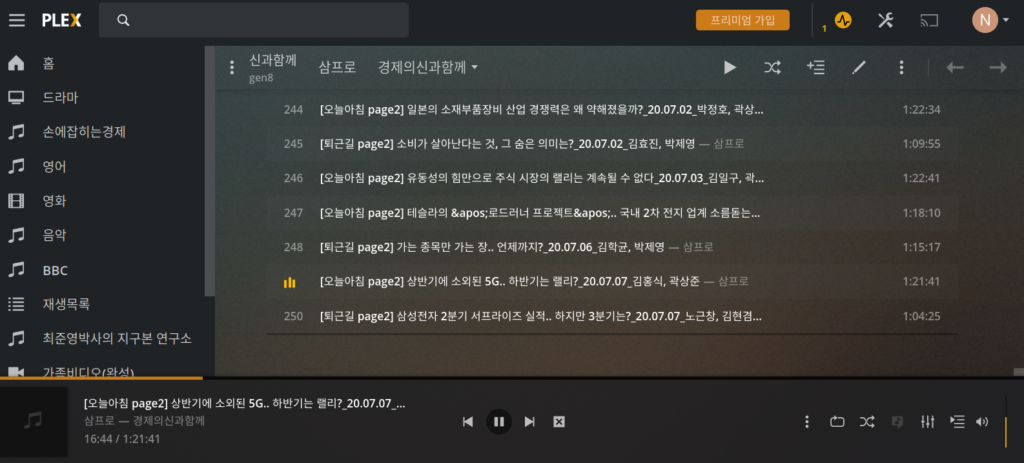
    여기에 이어서..이렇게 하면 plex가 idtag를 입력하는데, 파일 이름으로 입력한다. 불행히도 업로드 정보가 정확하지 않아 파일 이름만 보고는 도저히 언제 방송했는지 찾을 수 없다. 이 부분을 정리하기로 했다.

    ID3를 입력하면 plex가 앨범?을 정보를 업데이트하여 입력한다. pubDate를 입력하면 좋으나, 앨범이 너무 많이 분리된다. 하나 앨범으로 track no를 다르게 입력했다. chmod 0 *.mp3를 몇 번 하다보면 파일 생성 날자를 잃어버려 참조한 파일을 기준으로 역순 정리했다.

    1. podcastDownload.sh 팟 캐스트 다운로드 스크립트. feed에서 필요한 url을 찾아 파일 정보, 출시 날자를 하나 파일로 만듦.
    2. makePodv2.sh. 1번에서 만든 파일을 기준으로 mid3v2로 해당 파일에 정보 입력.
    3. details.txt 디렉토리에 있어, 해당 디렉토리를 어떻게 mid3v2로 입력할지 규칙 설정. makePodv2.sh가 참조하는 파일.

    아래는 경제의 신과 함께 다운로드하는 podcastDownload.sh

    #!/bin/sh
    #
    # TEDTalks Downloader
    #
    # Copyright (C) 2009  Denver Gingerich
    #
    # Permission to use, copy, modify, and/or distribute this software for any
    # purpose with or without fee is hereby granted, provided that the above
    # copyright notice and this permission notice appear in all copies.
    #
    # THE SOFTWARE IS PROVIDED "AS IS" AND THE AUTHOR DISCLAIMS ALL WARRANTIES
    # WITH REGARD TO THIS SOFTWARE INCLUDING ALL IMPLIED WARRANTIES OF
    # MERCHANTABILITY AND FITNESS. IN NO EVENT SHALL THE AUTHOR BE LIABLE FOR
    # ANY SPECIAL, DIRECT, INDIRECT, OR CONSEQUENTIAL DAMAGES OR ANY DAMAGES
    # WHATSOEVER RESULTING FROM LOSS OF USE, DATA OR PROFITS, WHETHER IN AN
    # ACTION OF CONTRACT, NEGLIGENCE OR OTHER TORTIOUS ACTION, ARISING OUT OF
    # OR IN CONNECTION WITH THE USE OR PERFORMANCE OF THIS SOFTWARE.
    
    
    #cron을 위한 cd
    cd /mnt/ExtHDD2/PODcast/PODcast
    
    echo "TEDTalks Downloader v0.1"
    echo "by Denver Gingerich (http://ossguy.com/)"
    echo
    
    which wget
    if [ $? -eq 0 ]; then
    	echo "Using wget..."
    	GET_CMD="wget --quiet -O"
    else
    	which curl
    	if [ $? -eq 0 ]; then
    		echo "Using curl..."
    		GET_CMD="curl -L -o"
    	else
    		echo "Could not find wget or curl"
    		exit 2
    	fi
    fi
    echo
    
    podcast_address=http://minicast.imbc.com/PodCast/pod.aspx?code=1000671100000100000
    FEED=feed_podcast.xml
    URLS=urls_podcast
    
    echo "신과함께 다운로드"
    TITLE=title.txt
    INFOFILE=신과함께FileAndTitle.txt
    DIRNAME=신과함께
    rm -f ${FEED}
    podcast_address=http://pod.ssenhosting.com/rss/geesik02
    #lynx로 변경..
    #wget은 파일을 받을 수 없음.
    #${GET_CMD} ${FEED} ${podcast_address}
    lynx -source ${podcast_address} > ${FEED}
    
    cat ${FEED} | sed -n '/^<title>\[.*page2.*\]/,/type="audio/p' | grep enclosure | cut -d'"' -f2 > ${URLS};
    
    #target file을 만듦.
    cat ${FEED} | tr -d '\n' | sed  's/<item>/\n<item>/g' > ${TITLE}
    while read filename;
    do
    	#echo $filename;
    
    	#FILE="http://file.ssenhosting.com/data1/geesik02/SSSSS.mp3"
    	#tmpTitle=$(cat ${TITLE} | grep $filename | awk 'BEGIN{FS="[<>]"}/<title>/{print $5}'| tr -d '	')
    	#아래 삭제.
    	#tmpTitle=$(cat ${TITLE} | grep "$filename" | awk 'BEGIN{FS='<title>'}{print $2}' | awk 'BEGIN{FS='</title>'}{print $1}')
    	#여기가 맞는 표현
    	#tmpTitle=$(cat ${TITLE} | grep "$filename" | awk 'BEGIN{FS="<title>"}{print $2}' | awk 'BEGIN{FS="</title>"}{print $1}')
    	tmpTitle=$(cat ${TITLE} | grep "$filename" | awk 'BEGIN{FS="<title>"}{print $2}' | awk 'BEGIN{FS="</title>"}{print $1}')
    
    	#tmpPubdate=$(cat ${TITLE} | grep $filename | awk 'BEGIN{FS="[<>]"}/<title>/{print $33}'| tr -d '	')
    	tmpPubdate=$(cat ${TITLE} | grep "$filename" | awk 'BEGIN{FS="<pubDate>"}{print $2}' | awk 'BEGIN{FS="</pubDate>"}{print $1}')
    	#echo $tmpTitle;
    	#echo $tmpPubdate;
    
    	#printf "$filename""\t""$tmpTitle""\t""$tmpPubdate""\n">> ${INFOFILE}
    	#printf 사용할 경우, %가 들어가면 문제..아래와 같이 사용.
    	printf "$filename\t%s\t%s\n" "$tmpTitle" "$tmpPubdate" >> ${INFOFILE}
    
    done < ${URLS}
    
    
    #detail에 사용할 수 있도록 이동.
    rm ${DIRNAME}/${INFOFILE}
    mv ${INFOFILE} ${DIRNAME}
    mkdir -p ${DIRNAME}
    cd ${DIRNAME}
    for line in `cat ../${URLS}`; do
    	#SIZE=`echo ${line} | cut -d: -f1`
    	#echo "출력분"
    	#URL=`echo ${line} | cut -d'"' -f2-`
    	#echo $URL
    	URL=`echo ${line}|tr -d '\r'`
    	FILENAME=`basename ${URL}|tr -d '\r'`
    	#echo ${URL}
    	#echo ${FILENAME}
    	if [ ! -f "${FILENAME}" ]; then
    #	 || [ ${SIZE} -ne `ls -l "${FILENAME}" | awk '{print $5}'` ]; then
    		rm -f "${FILENAME}"
    		${GET_CMD} "${FILENAME}" "${URL}"
    	fi
    done
    
    cd ..


    아래는 makePodv2.sh

    #!/bin/bash
    
    #for FILE in *.webm; do
    #   echo -e "Processing video '\e[32m$FILE\e[0m'";
    #   ffmpeg -i "${FILE}" -vn -ab 320k -ar 44100 -y "${FILE%.webm}.mp3";
    #done;


    order=$(mktemp);
    
    
    #FILE="AlexisFfrench-AMomentInTime-woETd5QW52E.mp3"
    #Details.txt 파일에 형식 정의 ^I로 구분됨.
    #SONGEXP: 곡 형식
    
    FILEEXP=$(cat ./details.txt | grep -w FILETYPE | cut -d'	' -f2-)
    
    
    #참조할 파일.
    EXTRAINFO=$(cat ./details.txt | grep -w PODCASTFILE | cut -d'	' -f2-)
    #기록된 파일에서 reverse order로 정렬.
    #앞에 파일이 최근..
    
    #echo $EXTRAINFO
    tac $EXTRAINFO > $order;
    #head -10 $order;
    
    #detail을 " "로 감쌈
    #echo $FILEEXP
    eval mfile="$FILEEXP"
    #echo $mfile
    total=$(ls *."$mfile" | wc -l)
    #echo "check"
    #echo $total
    #처음 시작시.
    trackNo=0
    #이어서 할 경우
    #trackNo=$(expr $total + 1)
    
    
    #for FILE in *."$mfile"
    #for FILE in $(ls *."$mfile" | sort -V)
    for FILE in $(ls *."$mfile" | sort -V | head -3)
    
    #for FILE in $(ls -- $mfile | sort -V)
    do
    	#echo "파일이름은" $FILE
    	#echo $mfile
    	#기록된 파일에서 reverse order로 정렬.
    	#앞에 파일이 최근..
    
    	trackNo=$(cat -n $order | grep $FILE | cut -d'	' -f1)
    	echo $trackNo
    	diskNo=$(expr $trackNo / 100 + 1)
    
    	#trackNo=$(expr $trackNo + 1)
    
    	#EXTRAFILE에서 file을 찾아 두번째 정보
    	SONGEXP=$(cat ./details.txt | grep -w SONGEXP | cut -d'	' -f2)
    	#echo $FILE
    	#echo "$SONGEXP"
    	#변수에서 읽은 expression을 실행하여 다시 변수에 할당.
    	eval song="$SONGEXP"
    
    	ARTISTEXP=$(cat ./details.txt | grep -w ARTISTEXP| cut -d'	' -f2)
    	#echo $ARTISTEXP
    	eval artist="$ARTISTEXP"
    	ALBUMEXP=$(cat ./details.txt | grep ALBUMEXP| cut -d'	' -f2)
    	eval album="$ALBUMEXP"
    	mYearDateEXPtmp=$(cat ./details.txt | grep -w mYearDateEXP| cut -d'	' -f2)
    	eval myeardatetmp="$mYearDateEXPtmp"
    	yeartmp=$(echo $myeardatetmp|cut -d' ' -f3);
    	monthtmp=$(echo $myeardatetmp|cut -d' ' -f2);
    	daytmp=$(echo $myeardatetmp|cut -d' ' -f1);
    	#echo $myeardatetmp
    	#echo $yeartmp
    	#echo $monthtmp
    	#echo $daytmp
    
    	#from 
    	#https://www.unix.com/shell-programming-and-scripting/191527-converting-month-into-integer.html
    	M=1
    	for X in Jan Feb Mar Apr May Jun Jul Aug Sep Oct Nov Dec
    	do
    		[ "$monthtmp" = "$X" ] && break
    		M=`expr $M + 1`
    	done
    
    
    	myeardate=$(date --date="$(printf "%s" $yeartmp-$M-$daytmp)" +"%Y-%m-%d")
    	#$yeartmp-$monthtmp-$daytmp "+%Y-%m-%d")
    
    
    	GENREEXP=$(cat ./details.txt | grep -w GENREEXP| cut -d'	' -f2)
    	eval genre="$GENREEXP"
    	ARTISTEXP2=$(cat ./details.txt | grep -w ARTISTEXP2| cut -d'	' -f2)
    	#echo $ARTISTEXP
    	eval artist2="$ARTISTEXP2"
    	echo "SONG" $song
    	echo "Artist" $artist
    	echo "Artist2" $artist2
    	echo "Album" $album
    	echo "Date" $myeardate
    	echo "Genre" $genre
    	echo "TrackNo" $trackNo
    	echo "Diskno" $diskNo
    	mid3v2 -t "$song" -A "$album" -a "$artist" -y "$myeardate" -T "$trackNo/$total" --TCON $genre --TPE2 "$artist2" --TPOS "$diskNo" "$FILE"
    	#track no를 입력하지 않음.
    	#mid3v2 -t "$song" -A "$album" -a "$artist" -y "$myeardate" --TCON $genre --TPE2 "$artist2"  "$FILE"
    
    
    done
    

    아래는 details.txt

    SONGEXP	$(cat $EXTRAINFO | grep $FILE | cut -d$'\t' -f2)
    ARTISTEXP	"삼프로"
    ALBUMEXP	"경제의신과함께"
    mYearDateEXPtmp	"2020-1-1"
    mYearDateEXP	$(cat $EXTRAINFO | grep $FILE | cut -d$'\t' -f3 | cut -d',' -f2| cut -d' ' -f1-4)
    GENREEXP	"팟캐스트"
    FILETYPE	"mp3"
    PODCASTFILE	신과함께FileAndTitle.txt
    

    입력 순서대로 역순 정리하여 track no를 할당한다. 이걸로 끝이다.

    자 이제 인프라는 됐으니, 돈만 벌면 된다!

  • inotify 예제

    linux system programming, 283p

    리눅스에 파일, 디렉토리를 감시하는 watch가 있다. 특정 경로를 설정하여 감시하여 적절한 이벤트를 작성할 수 있다.

    #include <sys/inotify.h>
    #include <stdlib.h>
    #include <errno.h>
    #include <stdio.h>
    #include <unistd.h>
    #define BUF_LEN 128 
    
    //int inotify_init1 (int flags);
    void main(){
    	int fd; //file descritor
    	int wd; //watch descriptor
    	const char path[50]="/home/now0930/test/ttt";
    	fd = inotify_init1 (0);
    	if (fd == -1) {
    		perror("inotify_init1");
    		exit(EXIT_FAILURE);
    		}
    
    	//printf("%d", IN_MODIFY);
    	wd = inotify_add_watch(fd, path, IN_OPEN);
    	if (wd == -1){
    		perror("add notify");
    		exit(EXIT_FAILURE);
    	}
    	printf("file descriptor is %d\n",fd);
    	printf("path is %s\n",path);
    	
    	//__attribute__ compiler가 제공하는 메모리 번지 정렬. 4바이트 단위로 정렬.
    	//https://blog.naver.com/PostView.nhn?blogId=msyang59&logNo=220885276415
    	char buf[BUF_LEN] __attribute__((aligned(4)));
    	//printf("buf[0] is  0x%ld\n",&buf[0]);
    	//printf("buf[1] is  0x%ld\n",&buf[1]);
    	//printf("buf[2] is  0x%ld\n",&buf[2]);
    	//printf("buf[3] is  0x%ld\n",&buf[3]);
    	//printf("buf[4] is  0x%ld\n",&buf[4]);
    	//printf("buf[5] is  0x%ld\n",&buf[5]);
    	//
    	//
    	ssize_t len, i = 0;
    
    	for (int j=0;j<5;j++){
    		i = 0;
    		/* read BUF_LEN bytes' worth of events */
    		len = read (fd, buf, BUF_LEN);
    		printf("char is %ld\n",buf);
    		printf("len is %ld\n",len);
    		//보통 이런 방식으로 사용.
    		/* loop over every read event until none remain */
    		while (i < len) {
    			struct inotify_event *event =
    			(struct inotify_event *) &buf[i];
    			printf ("wd=%d mask=%d cookie=%d len=%d dir=%s\n", event->wd, event->mask, event->cookie, event->len, (event->mask & IN_ISDIR) ? "yes" : "no");
    			/* if there is a name, print it */
    			if (event->len)
    				printf ("name=%s\n", event->name);
    				/* update the index to the start of the next event */
    			//printf("i is %d\n",i);
    			//printf("buf address is 0x%lx\n",&buf[i]);
    			if (event->mask && IN_ACCESS)
    				printf("the file was read\n");
    			i += sizeof (struct inotify_event) + event->len;
    			}
    	}
    
    
    	int ret;
    	ret = inotify_rm_watch(fd, wd);
    	if(ret)
    		perror("remove watch\n");
    	
    }
    
    
    [21:45:06]>rm ./a.out ;gcc notify.c;./a.out 
    notify.c: In function ‘main’:
    notify.c:45:21: warning: format ‘%ld’ expects argument of type ‘long int’, but argument 2 has type ‘char *’ [-Wformat=]
       printf("char is %ld\n",buf);
                       ~~^    ~~~
                       %s
    file descriptor is 3
    path is /home/now0930/test/ttt
    char is 140729024548928
    len is 16
    wd=1 mask=32 cookie=0 len=0 dir=no
    the file was read
    char is 140729024548928
    len is 16
    wd=1 mask=32 cookie=0 len=0 dir=no
    the file was read
    

  • 신과 함께 rss

    팟빵이 경제의 신과 함께를 호스팅하여 잘 듣고 있었다. 언젠가부터 rss로 표시되는 파일 경로를 숨겨버려 crontab으로 자동으로 받을 수 없었다. 한동안 듣지 못하다, 꼼수를 찾았다.

    http://pod.ssenhosting.com/rss/geesik02

    여기에 팟빵이 호스팅하는 모든 파일이 있다. 여기에서 해당하는 채널을 잘라 받으면 쉽다. 나중에 주소를 바꿀 수도 있지만, 귀찮아서 굳이 그렇게 하지 않을까 한다.

    #!/bin/sh
    #
    # TEDTalks Downloader
    #
    # Copyright (C) 2009  Denver Gingerich
    #
    # Permission to use, copy, modify, and/or distribute this software for any
    # purpose with or without fee is hereby granted, provided that the above
    # copyright notice and this permission notice appear in all copies.
    #
    # THE SOFTWARE IS PROVIDED "AS IS" AND THE AUTHOR DISCLAIMS ALL WARRANTIES
    # WITH REGARD TO THIS SOFTWARE INCLUDING ALL IMPLIED WARRANTIES OF
    # MERCHANTABILITY AND FITNESS. IN NO EVENT SHALL THE AUTHOR BE LIABLE FOR
    # ANY SPECIAL, DIRECT, INDIRECT, OR CONSEQUENTIAL DAMAGES OR ANY DAMAGES
    # WHATSOEVER RESULTING FROM LOSS OF USE, DATA OR PROFITS, WHETHER IN AN
    # ACTION OF CONTRACT, NEGLIGENCE OR OTHER TORTIOUS ACTION, ARISING OUT OF
    # OR IN CONNECTION WITH THE USE OR PERFORMANCE OF THIS SOFTWARE.
    
    echo "TEDTalks Downloader v0.1"
    echo "by Denver Gingerich (http://ossguy.com/)"
    
    which wget
    if [ $? -eq 0 ]; then
    	echo "Using wget..."
    	GET_CMD="wget --quiet -O"
    else
    	which curl
    	if [ $? -eq 0 ]; then
    		echo "Using curl..."
    		GET_CMD="curl -L -o"
    	else
    		echo "Could not find wget or curl"
    		exit 2
    	fi
    fi
    echo
    
    podcast_address=http://minicast.imbc.com/PodCast/pod.aspx?code=1000671100000100000
    FEED=feed_podcast.xml
    URLS=urls_podcast
    
    echo "신과함께 다운로드"
    DIRNAME=신과함께
    rm -f ${FEED}
    podcast_address=http://pod.ssenhosting.com/rss/geesik02
    #lynx로 변경..
    #wget은 파일을 받을 수 없음.
    #${GET_CMD} ${FEED} ${podcast_address}
    lynx -source ${podcast_address} > ${FEED}
    
    cat ${FEED} | sed -n '/^<title>.*page2/,/type="audio/p' | grep enclosure | cut -d'"' -f2 > ${URLS};
    
    mkdir -p ${DIRNAME}
    cd ${DIRNAME}
    for line in `cat ../${URLS}`; do
    	#SIZE=`echo ${line} | cut -d: -f1`
    	#echo "출력분"
    	#URL=`echo ${line} | cut -d'"' -f2-`
    	echo $URL
    	URL=`echo ${line}|tr -d '\r'`
    	FILENAME=`basename ${URL}|tr -d '\r'`
    
    	#echo ${URL}
    	echo ${FILENAME}
    	if [ ! -f "${FILENAME}" ]; then
    #	 || [ ${SIZE} -ne `ls -l "${FILENAME}" | awk '{print $5}'` ]; then
    		rm -f "${FILENAME}"
    		${GET_CMD} "${FILENAME}" "${URL}"
    	fi
    done
    
    cd ..
    
  • mutex 예제

    linux system programming, 238p. 두 시간 삽질했다. thread arg 를 포인터로 주는데 여러 개를 쓰려면 struct로 정의해서 써야 한댄다. 맞는지 틀린지..

    #include <pthread.h>
    #include <stdio.h>
    #include <unistd.h>
    
    
    //arg를 여러 파라미터로 사용하기 위해,
    //구조체로 정의
    //https://stackoverflow.com/questions/52812004/parameter-passing-multiple-values-using-void-pointer
    //여기 참조
    //공유 자원.
    int sharedInt=0;
    //mutex 설정.
    static pthread_mutex_t the_mutex = PTHREAD_MUTEX_INITIALIZER;
    
    struct myStruct {
    	//struct는 initilizer를 지원하지 않음.
    	char *message;
    	int index;
    	//index를 보고 입력된 파라미터로 hello, one, two, three를 선택.
    	//이렇게 구현하려 했으나, 힘들어 문자열로 변경.
    	//index로 sharedInt를 업데이트 하려 했으나,
    	//잘 안됨..
    	//스레드가 시작할 때마다 sharedInt를 업데이트 하면 기존 값을
    	//버리고 다시 씀!!
    	//thread 안에서만 공유 자원을 조작..
    
    
    };


    void* start_routine(void* arg ){
    	int pid;
    	int threadID;
    	//struct로 arg를 받기 위해, 
    	//struct로 변경.
    	struct myStruct *temp;
    
    	temp = arg;
    	//pointer 로 global 변수 변경
    
    	//pthread_mutex_lock(&the_mutex);
    	//sharedInt = temp->index;
    
    	//printf("my thread sentence is \"%s\"\n", temp->message);
    	//printf("temp->index is %d\n", temp->index);
    
    	pthread_mutex_lock(&the_mutex);
    
    	printf("SharedInt는 %d\n",sharedInt);
    	if(sharedInt == 0){
    		//strsep(temp->message, " ");
    		//printf("my thread word is %s\n",outputword);
    		printf("zero\n");
    		//temp->index++;
    
    	}
    
    	else if(sharedInt == 1){
    		//printf("my thread word is %s\n",outputword);
    		printf("one\n");
    		//temp->index++;
    
    	}
    	else if(sharedInt == 2){
    		printf("two\n");
    		//temp->index++;
    
    	}
    
    	else{
    		printf("three or more\n");
    	}
    	sharedInt++;
    
    	pthread_mutex_unlock(&the_mutex);
    
    	}
    
    int main(){
    
    	pthread_t thread[2];
    	int ret, errorno;
    	struct myStruct message = {"hello one two three", 0 };
    	printf("myStruct message index는 %d\n", message.index);
    	//아래 부분은 불필요 부분. thread 밖에서 조작하여 무의미함.
    	//message.index=2;
    
    	ret = pthread_create(&thread[0],NULL,start_routine,(void*)&message);
    
    	if(ret<0){
    		errorno = ret;
    		//printf("%d\n",errorno);
    		perror("pthread_create");
    		return -1;
    	}
    	//아래 부분은 불필요 부분. thread 밖에서 조작하여 무의미함.
    	//message.index=1;
    
    	//printf("myStruct message index는 %d\n", message.index);
    
    	//printf("struct 출력: %d",message.index);
    	//printf("message 확인 %d",message.index);
    
    	ret = pthread_create(&thread[1],NULL,start_routine,(void*)&message);
    
    	if(ret<0){
    		errorno = ret;
    		//printf("%d\n",errorno);
    		perror("pthread_create");
    		return -1;
    	}
    
    	//각 스레드 끝나길 대기
    
    	pthread_join(thread[0],NULL);
    	pthread_join(thread[1],NULL);
    	//mutex 삭제
    	pthread_mutex_destroy(&the_mutex);
    	printf("completed\n");
    	return 0;
    
    }
    

    100번 돌리면 mutex lock을 설정한 경우와 설정하지 않은 경우 값이 다름. 나름 이해했다고 믿고 싶다.

  • thread 예제

    linux system programming, 234p

    https://bitsoul.tistory.com/m/157 여기 참조.

    #include <pthread.h>
    #include <stdio.h>
    #include <unistd.h>
    
    
    void* start_routine(void* arg ){
    	int pid;
    	int threadID;
    	pid= getpid();
    	printf("pid is %d\n", pid);
    	threadID = pthread_self();
    	printf("tid is %lu\n",threadID);
    	printf("data is %s\n",arg);
    	}
    
    int main(){
    	pthread_t thread[2];
    	const char *message1="hello one";
    	const char *message2="hello two";
    	const char *message3="hello main";
    
    	int ret, errorno;
    	ret = pthread_create(&thread[0],NULL,start_routine,(void*)message1);
    	if(ret<0){
    		errorno = ret;
    		//printf("%d\n",errorno);
    		perror("pthread_create");
    		return -1;
    	}
    	ret = pthread_create(&thread[1],NULL,start_routine,(void*)message2);
    	if(ret<0){
    		errorno = ret;
    		//printf("%d\n",errorno);
    		perror("pthread_create");
    		return -1;
    	}


    	/*
    	for(int i=0;i<2;i++){
    		ret = pthread_create(&thread[i],NULL,start_routine,NULL);
    		if(!ret){
    			errorno = ret;
    			printf("%d\n",errorno);
    			perror("pthread_create");
    			return -1;
    		}
    	}
    	*/
    	int thread_compare=0;
    	//스레드가 다르면 0, 같으면 0이 아는 수 리턴.
    	//다른 스레드로 0을 리턴.
    	thread_compare = pthread_equal(thread[0], thread[1]);
    	printf("thread is same? %d\n",thread_compare);
    	sleep(1);
    	//메인에서  start_routine.
    	start_routine((void*)message3);
    
    
    	//각 스레드 끝나길 대기
    
    	pthread_join(thread[0],NULL);
    	pthread_join(thread[1],NULL);
    	return 0;
    
    }
    

    위 코드를 실행하면 아래와 같다. race condition으로 매 실행 다른 결과를 보았다.

    pi@raspberrypi:~/Project/cCode/systemProgram $ gcc -lpthread mythread.c ;./a.out 
    thread is same? -1235590048
    pid is 14996
    tid is 3059377248
    data is hello two
    pid is 14996
    tid is 3067769952
    data is hello one
    pid is 14996
    tid is 3069673600
    data is hello main
    pi@raspberrypi:~/Project/cCode/systemProgram $ gcc -lpthread mythread.c ;./a.out 
    pid is 15068
    tid is 3067769952
    data is hello one
    pid is 15068
    tid is 3059377248
    data is hello two
    thread is same? 0
    pid is 15068
    tid is 3069673600
    data is hello main
    pi@raspberrypi:~/Project/cCode/systemProgram $ gcc -lpthread mythread.c ;./a.out 
    pid is 15125
    tid is 3068077152
    data is hello one
    thread is same? 0
    pid is 15125
    tid is 3059684448
    data is hello two
    pid is 15125
    tid is 3069980800
    data is hello main
    

    gnu c는 pthread가 전부인가 보다.